Coming soon to the Chrome Web Store

Stop copy-pasting
from websites.

PagePull turns any web page into a clean spreadsheet. Describe the columns you want in plain English — no code, no selectors, no setup.

Free tier · Works on any page you can open · Your data stays in your browser

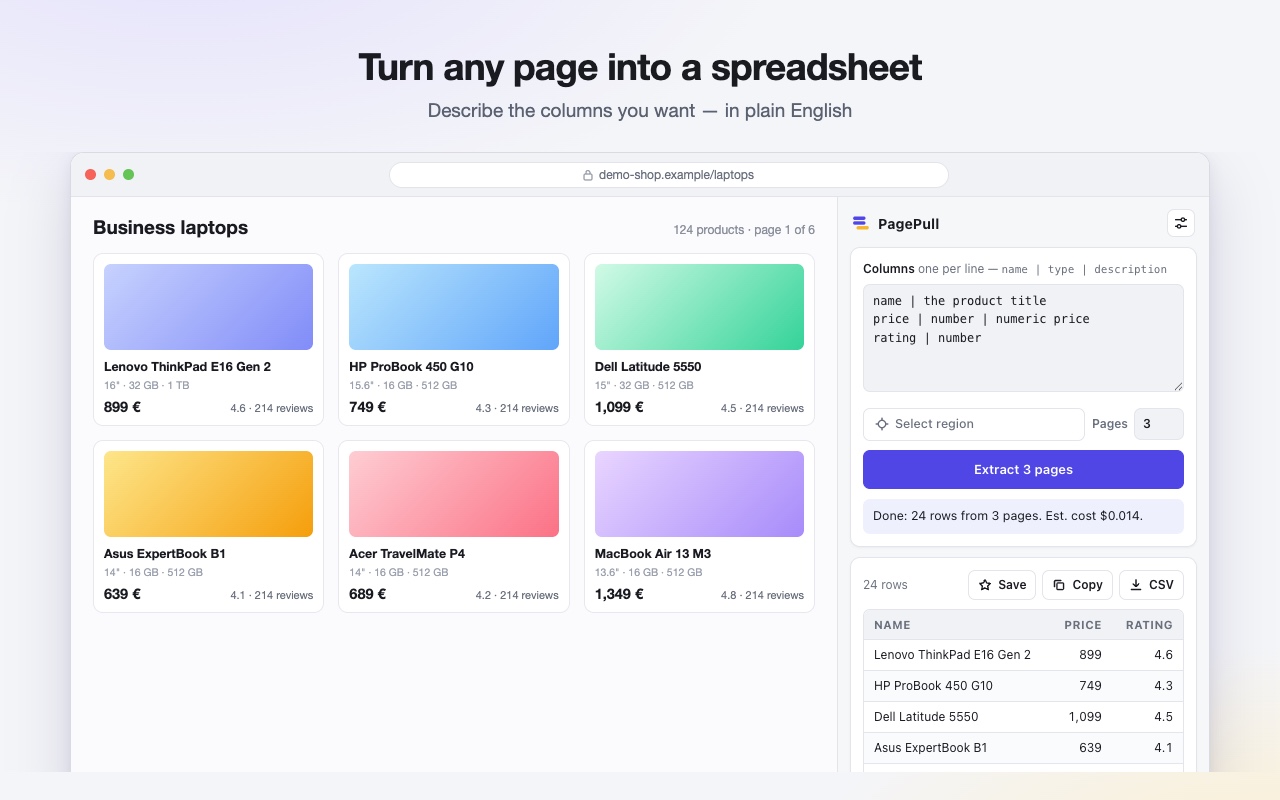
PagePull side panel open next to an online shop, extracting product names, prices and ratings into a table.

Three steps. About ten seconds.

No configuration, no learning curve — if you can name the columns, you can use it.

1

Open any page

Product listings, search results, directories, job boards — anything you can see in Chrome, including pages behind your own login.

2

Name your columns

Type what you want in plain English: name, price, rating. That's the entire configuration.

3

Get your table

Export to CSV, paste straight into Google Sheets or Excel — or save it and re-run with one click later.

Built for people whose work lives in spreadsheets

If you've ever spent an evening copying data off websites, this is for you.

Online sellers
Track competitor prices and listings across marketplaces — and know the day they change.
Sales teams
Turn directories and search results into lead lists with names, sites and contact details.
Recruiters
Collect roles and candidate listings into one sheet instead of forty browser tabs.
Researchers & analysts
Gather tabular data from anywhere without writing a scraper or maintaining one.

Why it beats old-school scrapers

Traditional scraper extensions make you click page elements and configure rules — then break when the site changes.

It survives redesigns

PagePull reads the page the way a person does, so a layout change doesn't break your extraction. No selectors to repair.

It watches for changes

Save a page as a monitor and PagePull re-checks it on your schedule, alerting you only when the data actually changed.

Your data stays yours

We never store the pages you extract or the tables they produce. Prefer that nothing touches us at all? Switch to your own Anthropic key and it won't.

Private by design

PagePull reads a page only when you press Extract. We don't store page content or results, we don't track your browsing, there's no analytics, and there's nothing to sell. If you'd rather your pages never reached us at all, use your own Anthropic key and they go straight from your browser to Anthropic.

Read the privacy policy

Questions

Do I need to know how to code?

No. You type the names of the columns you want — for example name, price, rating — and PagePull works out the rest. There is nothing to configure and nothing to maintain.

What does it cost to run?

Start free — 25 extractions a month, no API key and no card. Pro is $15/month for 500. If you'd rather pay Anthropic directly, you can plug in your own API key instead and a typical page costs well under a cent.

Can it handle more than one page?

Yes. Set how many pages you want and PagePull clicks through the site's own “next” control, merging everything into one de-duplicated table.

How does monitoring work?

Save an extraction as a recipe, then choose how often to check it. PagePull re-opens the page in the background, compares the results with the last run, and notifies you only when the data actually changed — a new listing, a price drop, a removed item.

Is my data safe?

On a PagePull plan, the page's content passes through our extraction service on its way to Anthropic — it's processed to answer that one request and never written down. We keep only a count of your extractions and the page's hostname. On your own API key, the content goes straight from your browser to Anthropic and never reaches us. Either way your results stay in your browser, and your API key never leaves your computer. See the privacy policy.

Which sites does it work on?

Any regular web page you can open in Chrome, including pages you're logged into. PagePull only ever reads the page you explicitly ask it to. Please respect the terms of service of the sites you use it on.